Smart charging
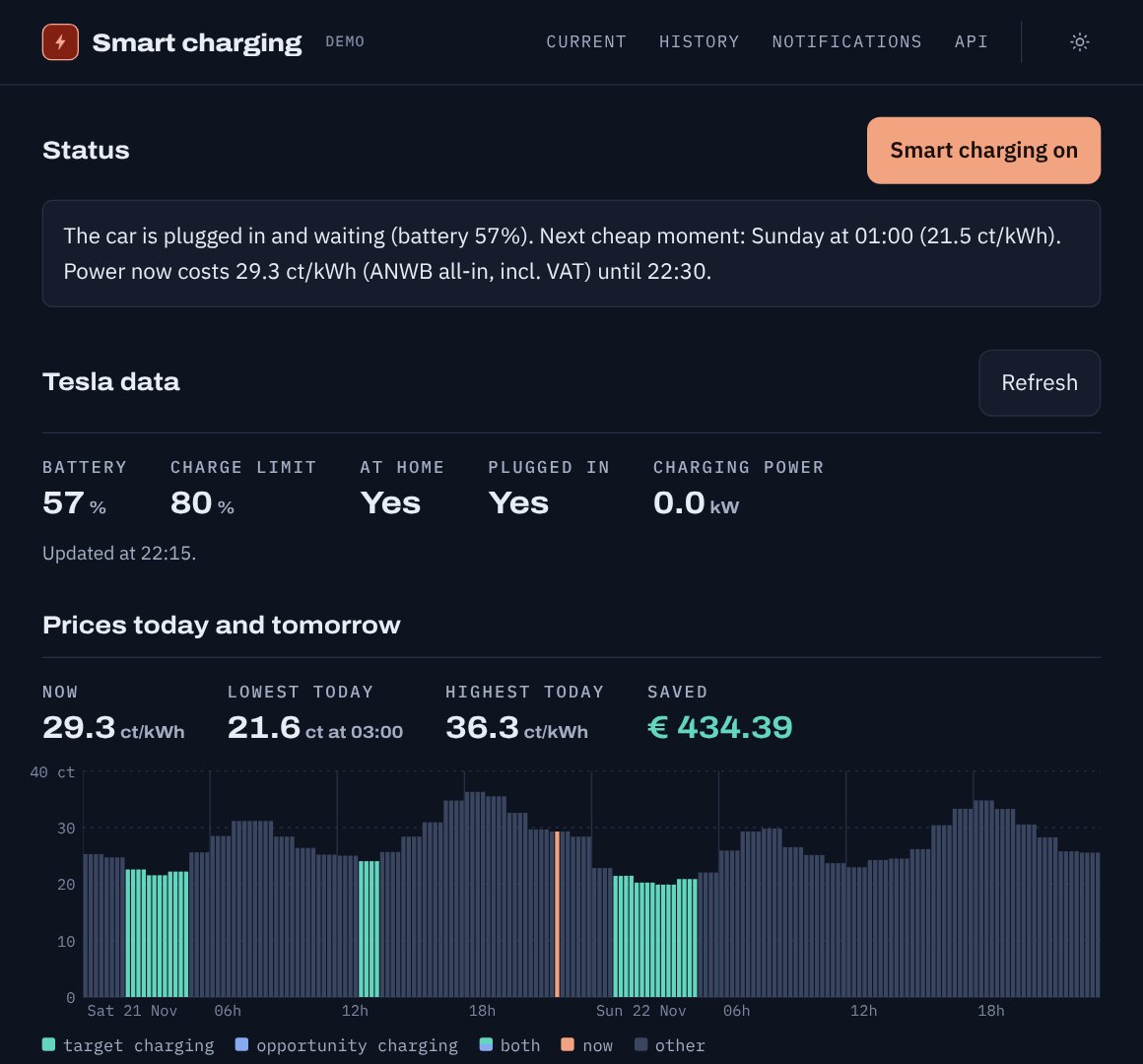
A home-made charging assistant for our Tesla Model Y. With a dynamic energy contract the price of power changes every quarter hour. The app charges the car when power is cheap, charges on surplus solar power and sets the charge limit in the car itself. Built with Claude Code, on the home server.
Try the demo →- Prices per day
- 96
- Connections
- 4
- Charge limit
- 80 · 90%
- Cost per month
- € 0
Prices, sun and car together
The app on the home server fetches the power prices every day and hears from the car, the inverter and the smart meter how things stand. Every quarter hour it decides whether the car charges, and up to which percentage. It sends that to the car as a command. On my phone I can see what it does.
From plan to a car that charges itself
Claude wrote the plan, the code and the explanations in the app. I chose what the app is allowed to do, the percentages and when it leaves the car alone. Every change went into the repository as a pull request, and I tested with the real car in the driveway.
-
1
A plan first
ClaudeOff-the-shelf services can do a lot, but they don't know my contract, panels and meter. Claude wrote a plan in phases: first the connections, then watching along, and only then taking control. The calendar link and fast charging on the road were dropped; they added too little.
-
2
Our own link with the car
Tesla Fleet APIThe app is registered with Tesla on scher.nl and has its own digital key in the car. The car streams live data to our own Fleet Telemetry server. At home on wifi that doesn't always work; then the app asks the car itself, without waking it.
-
3
Working per quarter hour
EnergyZeroThe hourly prices come from EnergyZero, for today and from 13:00 also for tomorrow. The app converts them into the ANWB price: market price plus VAT, purchase costs and energy tax. Target charging charges to 80% in the cheapest hours. Opportunity charging raises the limit to 90% when the price drops below a threshold.
-
4
Charging on our own sun
HomeWizardThe P1 meter measures every second what the house draws or feeds back. If there is enough surplus for five minutes, the app starts charging and matches the charging current to the surplus. To spare the car it changes the current at most once every 4 minutes, and only for a difference of more than 250 W.
-
5
Watching along first
Shadow modeBefore the app was allowed to control the car, it only calculated along: what would each charging method have cost for my own charging sessions? Now the history shows for every session what charging right after plugging in would have cost, and how much the app saved.
-
6
Notifications
ntfyVia ntfy I get messages on my phone. On the Notifications page I switch each type on or off: cheap charging (the car is at home without the plug in and a cheap moment is coming within the hour), charging started or paused, preconditioning switched on, and errors. Below that are all sent notifications with a date filter, including those held back by quiet hours or the maximum per day.
Where the Tesla has a mind of its own
A Tesla has habits of its own that get in the way of smart charging. The app can't switch them off, so it has to work around them. Each of these three only came to light with the real car in the driveway.
Plugging in means charging right away
What happens. As soon as the plug goes in, the car starts charging, even when power is expensive at that moment. On top of that, at home on wifi the car sends no live data, so at first the app only noticed the charging at its next check, up to 30 minutes later.
How the app solves it. The P1 meter notices when the house suddenly draws 4 kW or more. The app then asks the car right away. If it is not a cheap moment and the battery is above 30%, the app pauses charging: it temporarily sets the charge limit to the current battery level, and sets it back in the next cheap quarter hour. If I then start charging myself in the Tesla app, the app leaves the car alone until the plug comes out.
Preconditioning runs on grid power
What happens. With the plug in, the car takes the power for preconditioning from the grid, even when it isn't charging. On a cold morning that is easily a few kW at the most expensive time of day. A stop command doesn't help: the car isn't charging at that moment.
How the app solves it. The app recognises preconditioning on the P1 meter (more than 2 kW while the car is plugged in and not charging) and asks the car. If it is an expensive moment, it temporarily sets the charging current as low as possible. Whatever extra the heating needs then comes from the battery, which the app tops up later in a cheap quarter hour. Time and temperature stay as set in the Tesla app; the app never cancels preconditioning. The charging current goes back as soon as preconditioning ends, the car starts charging, the plug comes out, a cheap moment arrives or after 2 hours at most.
Starting charging switched off the departure schedule
What happens. On 23 November the car wasn't preconditioned in the morning, although it was scheduled in the Tesla app. Most likely the app's start command switched off the Tesla's scheduled departure programme.
How the app solves it. The app now pauses and resumes charging through the charge limit instead of stop and start commands; only below 50% (Tesla's minimum) does it still send a stop. In the 45 minutes before a scheduled departure with preconditioning it leaves the Tesla's charging alone. And if the climate control is still off a quarter of an hour before departure, the app switches it on, once per departure, and I get a notification. If the car refuses with a fault, the app doesn't try again and reports it once.
Dumb charger, smart charger or this app
At home there is a dumb charger: it delivers power as soon as the plug goes in, nothing more. A smart charger can do more, but it only controls the power going through the cable. This app controls the car itself. That's why it knows more than a charger does, and no new charger is needed.
| What | Dumb charger | Smart charger | Dumb charger + this app |
|---|---|---|---|
| Charging in the cheapest quarters | No, charges as soon as it's plugged in | Often, via the maker's app or an energy service | Yes, on the ANWB price per quarter hour with my own surcharges |
| Knows how full the battery is | No | Usually not; the charger only sees how much current flows | Yes, the app asks the car |
| Setting the charge limit in the car | No | No | Yes, 80% normally and 90% when power is very cheap |
| Charging on surplus solar power | No | Yes, usually with an extra meter in the fuse box | Yes, with the P1 meter that was already there |
| Departure time and preconditioning | No | Sometimes a departure time, nothing more | Yes: looks at the scheduled departure in the Tesla and watches over preconditioning |
| Overload protection (load balancing) | No | Yes | No, on purpose (see below) |
| Works with | Any car | Any car | Only a Tesla |
| Extra cost | None | A new charger, sometimes a subscription | None; runs on the home server that was already there |
What a smart charger does have
Not everything a smart charger can do adds something here. So these things are deliberately left out.
- Load balancing. A smart charger slows down when the house draws a lot of power, so the main fuse doesn't trip. We measured first: in six days the P1 meter saw a highest peak of 11.1 kW, against about 17.3 kW that the 3×25 A connection can handle. Only charging at 16 A while cooking on induction can make one phase tight. That's why the app charges at 12 A (about 8 kW), and load balancing is a solution to a problem that doesn't exist here.
- Controlling the charger. Smart chargers talk to a service via OCPP. The app controls the car, not the charger, so it works with the charger that was already there.
- Charge card and certified meter. Useful when an employer pays for the power or when others charge at your place. For our own car at home, the per-session history in the app is enough.
- Calendar link. The scheduled departure in the Tesla is enough to watch over preconditioning.
- Weather strategy. For a while the app looked at the weather from Open-Meteo: charging a few kWh just before departure in the cold, leaving room overnight when tomorrow would be sunny. On 23 November I took that out again. In the cold, preconditioning is on anyway and that already warms the battery; the rest added too little.
Ground rules for the app
- One button switches smart charging off. The car then gets its own charge limit back and charges as set in the Tesla app again.
- Below 30% the car always charges right away, whatever power costs.
- If I start charging myself, the app leaves the car alone until the plug comes out. And it starts or stops at most once every 10 minutes.
- The app never wakes the car. That costs battery and weighs heavily on the Tesla bill; this way it stays within the free credit of $10 per month.
- Keys and tokens live only on the server, never in git or in a chat. The app itself can only be opened via Tailscale.
What's inside
| Part | Choice |
|---|---|
| App | Python with FastAPI in Docker on the home server |
| Car | Tesla Fleet API and Fleet Telemetry, own virtual key, commands via the tesla-http-proxy |
| Prices | EnergyZero (public, per hour), with ANWB surcharges set by me; calculated per quarter hour |
| Solar | GoodWe GW3600T-DS, 3.8 kWp, read locally |
| Grid | HomeWizard P1 meter, local API |
| Notifications | ntfy, each type on or off, with a history of everything sent |
| Storage | SQLite: prices per quarter hour and the car every minute |
| Web app | Current, History, Notifications and API, own SVG charts, scher.nl house style, only via Tailscale |
Click through the demo
The demo is the same app as on the server, with a made-up year of prices, trips and charging sessions. Pick another method under Settings and see which quarters turn green, browse the days under History, see under Notifications which messages the app sent, or see under API which data a Tesla can pass on. Nothing goes to a car or server.
Open the demo →Updated 24 November 2026.